


✔ Verified Seller

Mobile Editing Mastery

Original price was: ₹4,999.00.Current price is: ₹199.00.

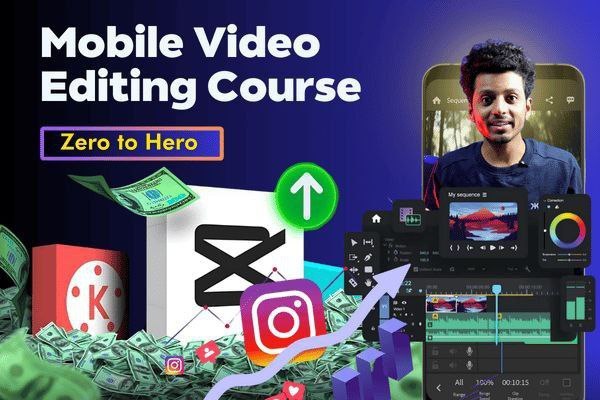
Mobile Editing Mastery: Create Pro-Level Videos on Your Phone 📱✨

Stop letting a “basic” setup hold back your creativity! You don’t need a $2,000 PC or expensive software like Premiere Pro to create viral, cinematic content. With Mobile Editing Mastery, you will learn how to turn your smartphone into a powerful production studio.

Whether you are an aspiring YouTuber, an Instagram Reel creator, or a business owner, this course will teach you the exact workflows used by top-tier creators to edit high-quality videos—entirely on mobile.

Guaranteed Safe Checkout

Mobile Editing Mastery: Create Pro-Level Videos on Your Phone 📱✨

Stop letting a “basic” setup hold back your creativity! You don’t need a $2,000 PC or expensive software like Premiere Pro to create viral, cinematic content. With Mobile Editing Mastery, you will learn how to turn your smartphone into a powerful production studio.

Whether you are an aspiring YouTuber, an Instagram Reel creator, or a business owner, this course will teach you the exact workflows used by top-tier creators to edit high-quality videos—entirely on mobile.


What You Will Master (Course Curriculum)

  • The Pro Workflow: Setting up your project for success and navigating the best mobile editing apps (CapCut, VN, LumaFusion).

  • Precision Cutting & Trimming: How to maintain “viewer retention” with tight, professional pacing.

  • Cinematic Transitions: Moving beyond basic fades to seamless, invisible, and trendy transitions.

  • Advanced Keyframing: Bringing static images and text to life with custom motion.

  • Color Grading: Turning flat mobile footage into vibrant, cinematic masterpieces.

  • Sound Design & Music: Mastering audio ducking, sound effects (SFX), and finding copyright-free music.

  • Text & Captions: Creating those “viral-style” animated captions that keep people watching.

  • Export Settings: The “Secret Sauce” for uploading 4K/60fps content without losing quality on social media.


Why Choose This Mastery?

  1. Zero Gear Needed: If you have a smartphone, you’re ready to start.

  2. Speed & Efficiency: Learn how to edit a professional Reel or TikTok in under 20 minutes.

  3. Aesthetic Focus: We don’t just teach buttons; we teach the art of storytelling and visual flow.

  4. Updated for 2026: Includes the latest AI-assisted editing features and trending styles.


This Course Is For:

  • Instagram & TikTok Creators: Who want to stand out in a crowded feed.

  • Vloggers: Who want to edit and upload while traveling without carrying a laptop.

  • Entrepreneurs: Who need high-converting video ads for their products.

  • Beginners: Who find desktop software too intimidating or expensive.


Bonus Content Included:

  • 🎁 Exclusive Overlay Pack: Light leaks, dust, and film grains for that “vintage” look.

  • 🎁 SFX Library: A curated collection of “Whoosh,” “Click,” and “Pop” sounds to level up your audio.

  • 🎁 Font Bundle: 50+ professional fonts that look better than the standard app defaults.


Don’t just record—create. Elevate your content and start your journey to becoming a Mobile Editing Master today!

#MobileEditing #CapCutMastery #VideoEditing #ContentCreator #MobileCinematography #VlogEditing #TechWithAI

⭐ Customer Review

A
Arjun K. (Lifestyle Content Creator)
⭐⭐⭐⭐⭐

"I used to spend hours on my laptop and still couldn't get that 'trendy' look. After taking this course, I edited a Reel in 15 minutes using the keyframing techniques I learned, and it hit 100k views in three days! This course is a cheat code for creators."

S
Sarah D. (Freelance Videographer)
⭐⭐⭐⭐⭐

"I was skeptical about whether mobile editing could look professional, but this course proved me wrong. The Color Grading and Sound Design modules are insane. My clients can’t believe I edited their brand promos entirely on my phone!"

V
Vikram Malhotra (Entrepreneur)
⭐⭐⭐⭐⭐

"As a business owner, I don't have time to sit at a desk. This course taught me how to edit high-quality ads during my commute. The Export Settings section alone saved me so much frustration—no more blurry uploads!"

I
Ishita R. (Travel Vlogger)
⭐⭐⭐⭐⭐

"The way the 'Pro Workflow' is explained changed everything for me. I used to get overwhelmed with too many clips, but now my editing is organized and fast. The SFX and Overlay bonuses are the cherry on top!"

❓ FAQs

The course primarily focuses on CapCut and VN Video Editor because they are powerful, user-friendly, and available on both iOS and Android. However, the storytelling and pacing techniques you learn are universal and can be applied to any mobile editing app.
If your phone can record 1080p video, it can edit it! While newer smartphones with faster processors make the process smoother (especially for 4K), we teach optimization tricks—like using proxy files and clearing cache—that allow you to edit high-quality projects even on mid-range devices
The biggest difference is speed and accessibility. While PC software (like Premiere Pro) is great for heavy VFX, mobile editing has become so advanced that you can now do 90% of the same tasks—like keyframing, masking, and chroma key—much faster and from anywhere. We show you how to close that "quality gap" completely.
Absolutely! A huge part of this mastery is dedicated to Color Grading and Cinematic Lighting. We show you how to use filters, adjust curves, and add overlays like film grain and light leaks to make your mobile footage look like it was shot on a professional cinema camera.
Yes! There is a massive demand for "short-form" content (Reels, TikToks, Shorts). Many brands and influencers prefer mobile editors because they can turn around content quickly. We include a guide on how to build a mobile-only portfolio to start taking on freelance clients immediately.
from
🔥 Sale Alert! Your favorite products are now at amazing prices. Shop now!
Total
Buy Now
Scroll to Top