


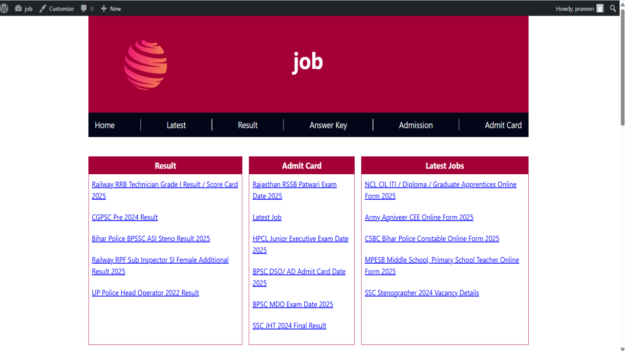
Download Sarkari Result WordPress Theme with Auto Post Upload Feature
In the digital era where government job aspirants constantly seek timely updates on Sarkari exams, results, admit cards, and application forms, running a well-structured Sarkari result website can be both rewarding and impactful. If you’re looking to launch a professional, automated Sarkari job portal with minimal manual effort, the Sarkari Result WordPress Theme with Auto Post Upload Feature is your go-to solution.
This article dives deep into the features, benefits, and setup process of this powerful WordPress theme and how it allows you to fetch articles from multiple
URLs and auto-publish them into designated categories like Admit Card, Results, Job Alerts, and more.
✅ Method : Install via cPanel / FTP
If the theme is too large or the upload fails:
-
Extract the downloaded .zip file on your computer.
-
Connect to your website using FTP (FileZilla) or your hosting cPanel File Manager.
-
Go to the folder:
/wp-content/themes
-
Upload the extracted theme folder here.
-
Go back to WordPress Dashboard → Appearance → Themes.
-
You’ll see the uploaded theme, click Activate.
What is the Sarkari Result WordPress Theme?
The Sarkari Result WordPress Theme is a pre-designed website template tailored for government job portals. It mimics the layout, style, and usability of popular Sarkari result websites while offering modern WordPress capabilities like SEO optimization, responsive design, and plugin compatibility.
It’s ideal for:
-
Bloggers focusing on government job updates
-
Affiliates promoting Sarkari exam services
-
Agencies handling multiple job portals
-
Entrepreneurs launching a career portal with monetization plans
Key Features of the Theme
Here’s what makes the Sarkari Result WordPress Theme stand out:
✔ Clean and Lightweight Design
The theme loads fast, uses minimal code, and provides a clean interface that mimics the original Sarkari Result style.
✔ Mobile-Friendly & Responsive
Built with mobile-first design principles, it ensures that your visitors can access information seamlessly across devices.
✔ SEO Optimized
Comes with built-in schema markup, optimized meta tags, and breadcrumb support to improve search engine rankings.
✔ Auto Post Upload Feature (Bulk Import)
The standout feature of this theme is the ability to auto-post articles by fetching data from multiple URLs. You can simply add URLs from trusted sources, categorize the content, and publish it instantly or schedule it.
✔ Category-Based Content Posting
You can assign posts to categories such as:
-
✅ Admit Card
-
✅ Results
-
✅ Job Alerts
-
✅ Syllabus
-
✅ Answer Key
-
✅ Online Forms
This structure ensures better navigation for your users and stronger internal linking for SEO.
✔ Gutenberg & Classic Editor Compatible
Use your preferred content editor. Whether you prefer block editing or the classic format, the theme supports both.
Auto Post Upload from Multiple URLs: How It Works
This theme includes a built-in or plugin-supported feature that allows administrators to fetch articles from external URLs. This is particularly useful if you’re aggregating news or reposting government job updates from verified sources.
🧩 Step-by-Step Guide to Use the Auto Post Feature:
1. Add URLs to the Input Panel
Go to the WordPress dashboard. Under the theme options or plugin section, you’ll find an interface where you can enter multiple URLs from which content should be fetched.
2. Select or Create Categories
Before importing, assign the content to predefined categories like “Admit Card”, “Result”, or “Online Form”. This helps organize posts efficiently.
3. Content Extraction & Formatting
The tool fetches the title, content, images, and meta information from the source URLs. It also allows basic HTML sanitization and formatting before posting.
4. Post Scheduling or Instant Publishing
You can either:
-
Publish immediately
-
Set specific times for scheduled posting (ideal for drip-feeding content)
5. Automatic SEO Meta Insertion
The auto-post tool also allows you to customize or automatically insert meta tags such as:
-
Title Tags
-
Meta Description
-
Focus Keyword
-
Canonical URL
Use Cases of Auto Post Upload Feature
The Auto Post Upload feature is more than a convenience—it’s a productivity booster. Here’s how it benefits different users:
🔹 For Bloggers
No need to write everything manually. Just fetch articles from trusted sources and publish with proper attribution and SEO formatting.
🔹 For Digital Marketers
Set up multiple websites fetching different types of government job content and link them internally to boost SEO juice.
🔹 For Agencies
Manage several client portals by importing verified job updates, admit cards, and results automatically.
🔹 For Content Aggregators
Create a central news site pulling job updates from SSC, UPSC, IBPS, Railway, and State Boards.
SEO & Monetization Potential
The Sarkari Result niche is highly competitive, but also highly profitable. This theme is optimized to help you rise through Google ranks and generate income through:
-
Google AdSense: High CPC due to job-seeking intent
-
Affiliate Links: Promote online courses, books, or test series
-
Sponsored Posts: Accept listings from recruitment agencies
-
Email Subscriptions: Build a mailing list and monetize updates
The theme includes ad placement options in:
-
Header
-
Sidebar
-
Below posts
-
Inside content blocks
How to Install and Configure the Theme
🔧 Installation Steps:
-
Download the theme zip file
-
Login to WordPress dashboard
-
Go to Appearance > Themes > Upload
-
Activate the theme after installation
-
Install recommended plugins (Auto Post Fetcher, SEO plugin, etc.)
-
Import demo content (optional)
-
Configure categories and menu
Recommended Plugins for Enhanced Automation
Here are a few plugins that work perfectly with the Sarkari Result WordPress Theme to boost its auto-post capabilities:
| Plugin Name | Purpose |
|---|---|
| WP Automatic | Auto-fetch content from URLs |
| WP All Import | Import posts from XML/CSV |
| Yoast SEO | SEO meta tag automation |
| WP Scheduled Posts | Content planning and publishing |
| Advanced Custom Fields | Add custom data to job posts |
| Elementor (Optional) | For visual design customization |
Theme Customization Options
Even though it’s modeled after the traditional Sarkari Result site, the theme is fully customizable:
-
Change colors, typography, and logo
-
Modify homepage layout (grid or list)
-
Add featured sections like “Latest Updates” or “Top Exams”
-
Include notification bars or breaking news tickers
-
Enable dark/light mode switch for user comfort
Why Choose This Theme Over Others?
| Feature | Sarkari Result WP Theme | Generic WP Themes |
|---|---|---|
| Predefined Job Categories | ✅ | ❌ |
| Auto Post Upload | ✅ | ❌ |
| Clean Sarkari-style Design | ✅ | ❌ |
| Lightweight & Fast | ✅ | ⚠️ May Require Optimization |
| AdSense Optimized | ✅ | ⚠️ May Require Manual Setup |
Final Words
If you’re planning to start a government job portal or are already running one and looking to save time while enhancing user experience, the Sarkari Result WordPress Theme with Auto Post Upload Feature is your best bet. With category-based automation, URL-based content fetching, SEO tools, and easy monetization options, it’s a powerful all-in-one solution.
Start building your Sarkari Result website today, and take advantage of automation and speed like never before.